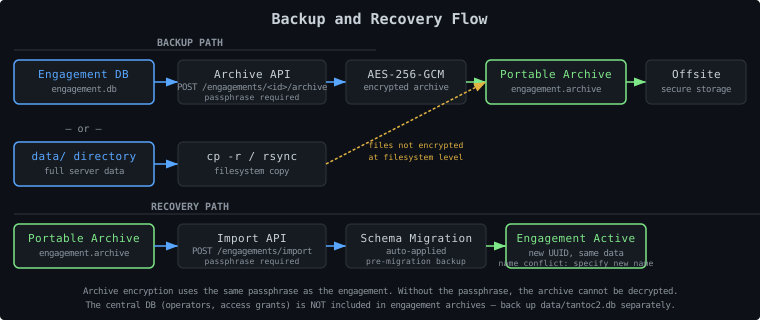
What to Back Up#
| Data | Location | Backup Method | Notes |
|---|---|---|---|
| Central database | data/tantoc2.db | File copy | Operators, engagements, access grants |
| Engagement databases | data/engagements/<uuid>/engagement.db | File copy or API archive | Agents, tasks, credentials, audit log |
| Build artifacts | data/builds/ | File copy | Agent binaries built during engagement |
| File transfers | data/file_transfers/ | File copy | Files uploaded/downloaded via agents |
| TLS certificates | /opt/tantoc2/certs/ | File copy | Server cert + key |
| Configuration | ~/.tantoc2/config.yaml | File copy | Server config |
| Engagement passphrases | External | Password manager | Critical — not stored on server |
The most critical backup item is the engagement passphrase. Without it, the engagement database cannot be decrypted or re-activated. Store passphrases in a team password manager, separately from the server.
Engagement Backup Methods#
Method 1: Encrypted Archive (Recommended)#
The archive API creates a portable, encrypted backup of a single engagement. The archive includes the engagement database and all associated metadata, encrypted with the engagement passphrase.
CLI:
| |
API:
| |
The archive file is self-contained and can be imported on any TantoC2 instance. Keep the archive and the passphrase stored separately — an attacker with both can read all engagement data.
Method 2: Filesystem Copy#
For a full server backup or a snapshot before upgrades:
| |
VACUUM INTO (SQLite online backup) for live copies.SQLite Online Backup (Live)#
For live backup without stopping the server, use SQLite’s online backup API:
| |
VACUUM INTO creates a consistent snapshot even with concurrent writes.
Engagement Import (Restore)#
Restore an engagement from an archive on any TantoC2 instance:
CLI:
| |
API:
| |
Notes on import:
- The engagement receives a new UUID on import — agent IDs and task IDs from the original are preserved, but the engagement identifier changes
- If a name conflict exists, specify a new name via the
namefield - Schema migrations are applied automatically during import. A pre-migration backup copy is created before any migration runs.
- Access grants from the original engagement are not imported — re-grant operator access after import
Key Material Backup#
What Is Key Material?#
| Material | Location | Sensitivity |
|---|---|---|
| Engagement passphrases | External (password manager) | Critical — never stored on server |
| PBKDF2 salt | data/tantoc2.db (engagement record) | Low — included in DB backup |
| TLS private key | /opt/tantoc2/certs/server.key | High — protects operator API |
| Agent private keys | Per-engagement DB (encrypted) | Protected by engagement passphrase |
Passphrase Backup#
Passphrases must be backed up outside the server:
- Create a record in your team password manager immediately when creating the engagement
- Share access with at least one other team member — if the engagement creator is unavailable, someone else must be able to re-activate it
- Label the record with the engagement name and UUID so it can be found quickly under pressure
- Never write passphrases to files on the server, in shell history, or in chat
TLS Certificate Backup#
| |
Keep the private key backup encrypted (gpg or a vault). If a TLS private key is compromised, regenerate the certificate and key and update the config.
Automated Backup#
Cron-Based Database Backup#
Add to crontab for the tantoc2 user:
# Daily live backup of central database
0 2 * * * sqlite3 /opt/tantoc2/data/tantoc2.db \
"VACUUM INTO '/opt/tantoc2/backups/tantoc2-$(date +\%Y\%m\%d).db'"
# Weekly full rsync to backup host
0 3 * * 0 rsync -av --delete /opt/tantoc2/data/ \
backup-host:/backups/tantoc2/Backup Script#
| |
Disaster Recovery Procedures#
Scenario 1: Server Crash (Data Intact)#
- Restore the server process:
1 2 3systemctl start tantoc2 # or docker start tantoc2 - Operators log in again (in-memory tokens do not survive restarts)
- Re-activate engagements (passphrase required for each)
- Verify agents are connecting and tasks are processing
Scenario 2: Data Directory Lost#
- Stop the server
- Restore from backup:
1rsync -av backup-host:/backups/tantoc2/ /opt/tantoc2/data/ - Start the server
- Re-activate engagements using the passphrases from your password manager
- Verify all engagements activate correctly
Scenario 3: Single Engagement Database Corrupted#
- Identify the engagement’s UUID and database path from the central DB:
1 2sqlite3 /opt/tantoc2/data/tantoc2.db \ "SELECT id, name, db_path FROM engagements;" - Stop the server
- Replace the corrupted database with the backup copy:
1 2cp /opt/tantoc2/backups/$TIMESTAMP/engagement-$UUID.db \ /opt/tantoc2/data/engagements/$UUID/engagement.db - Start the server
- Re-activate the engagement
Scenario 4: Restore to New Server (Migration)#
- Install TantoC2 on the new server
- Copy the data directory from the old server:
1rsync -av old-server:/opt/tantoc2/data/ /opt/tantoc2/data/ - Copy TLS certificates and configuration
- Start the server — operators and engagements are restored
- Re-activate engagements using passphrases from your password manager
- Update operator workstations to point to the new server address
- Update agent callback addresses if the listener IP/domain changed
Scenario 5: Passphrase Lost#
If the engagement passphrase is lost and no copy exists in the password manager, the engagement data is unrecoverable. The encryption is AES-256-GCM with a key derived from the passphrase — there is no backdoor.
Mitigation: Always store passphrases in a password manager with at least two team members having access before the engagement starts.
Backup Verification#
A backup you haven’t tested is not a backup. Schedule periodic restore tests:
- Spin up a test TantoC2 instance (Docker or VM)
- Copy the backup data to the test instance
- Start the server and verify the central DB loads (operators, engagements listed)
- Activate an engagement using the stored passphrase — if it opens, the backup is good
- Spot-check a few agents, tasks, and credentials to confirm data integrity
- Tear down the test instance
Document the test date and result. Run this at least monthly during active engagements.