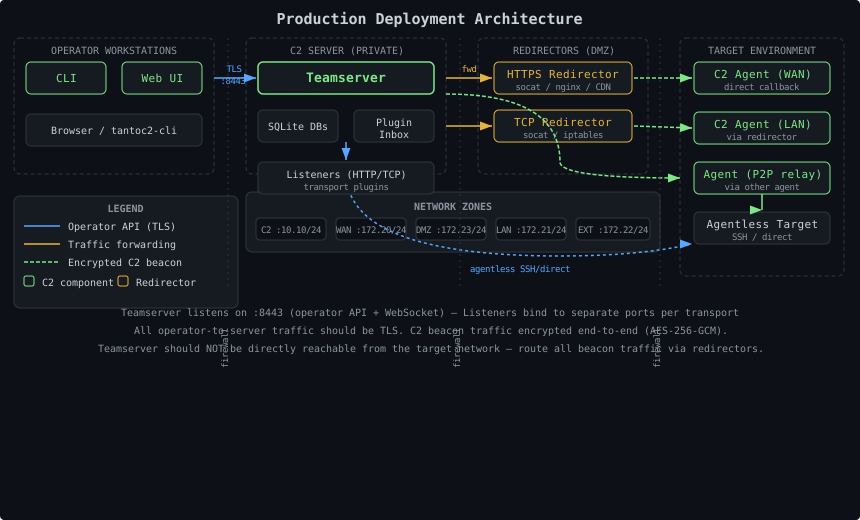
Reference configurations for deploying TantoC2 infrastructure — Docker Compose, redirector patterns, cloud deployments, and offline installs.
Reference Network Topology
# The recommended production topology uses network segmentation to isolate the teamserver from operator and target networks:
Network Subnet Purpose Reachable From c210.10.0.0/24 Operator access to teamserver Operator workstations only wan172.20.0.0/24 Internet-facing; agents beacon here via redirectors Internet (filtered) lan172.21.0.0/24 Internal target segment lan hosts only (internal) external172.22.0.0/24 Additional external target segment external hosts only dmz172.23.0.0/24 DMZ target segment via HTTPS redirector dmz hosts only
Key properties:
The teamserver is dual-homed : API on the C2 net, listener ports on the WAN Agents in internal segments cannot reach the teamserver directly — they beacon through redirectors Redirectors receive agent traffic and forward it to the teamserver listener ports P2P relay allows agents in the LAN to chain through agents with WAN access Docker Compose Reference Deployment
# Production-ready starting point. Adapt subnets and image references for your environment.
 1
 2
 3
 4
 5
 6
 7
 8
 9
10
11
12
13
14
15
16
17
18
19
20
21
22
23
24
25
26
27
28
29
30
31
32
33
34
35
36
37
38
39
40
41
42
43
44
45
46
47
48
49
50
51
52
53
54
55
56
57
58
59
60
61
62
63
64
65
x-common-logging : &common-logging
driver : "json-file"
options :
max-size : "50m"
max-file : "5"
networks :
c2 :
driver : bridge
ipam :
config :
- subnet : 10.10.0.0 /24
wan :
driver : bridge
ipam :
config :
- subnet : 172.20.0.0 /24
volumes :
server_data :
driver : local
services :
server :
image : tantoc2:latest
hostname : server
restart : unless-stopped
networks :
c2 :
ipv4_address : 10.10.0.20
wan :
ipv4_address : 172.20.0.10
volumes :
- server_data:/data
- ./certs:/data/certs:ro
environment :
TANTOC2_TLS_ENABLED : "true"
TANTOC2_TLS_CERT_FILE : /data/certs/server.crt
TANTOC2_TLS_KEY_FILE : /data/certs/server.key
TANTOC2_LOG_LEVEL : INFO
TANTOC2_LOG_REDACTION_ENABLED : "true"
TANTOC2_KEY_ROTATION_ENABLED : "true"
healthcheck :
test : [ "CMD" , "python3" , "-c" ,
"import socket; s=socket.create_connection(('localhost',8443),2); s.close()" ]
interval : 10s
timeout : 5s
retries : 6
start_period : 20s
logging : *common-logging
redirector :
image : alpine:latest
hostname : redirector
restart : unless-stopped
networks :
wan :
ipv4_address : 172.20.0.40
command : >
sh -c "apk add --no-cache socat &&
socat TCP-LISTEN:443,fork TCP:172.20.0.10:8080"
depends_on :
server :
condition : service_healthy
logging : *common-logging
This example uses socat for simplicity. For production redirectors, prefer nginx or Apache with proper logging, rate limiting, and the ability to strip identifying headers. Network Topology Rules
# Rule 1: Operators Never Share a Network with Targets
# Place operator workstations and the teamserver on a dedicated network that is not routable from target environments. Use a VPN, jump host, or private network.
Rule 2: Teamserver IP Should Not Appear in Agent Traffic
# The teamserver’s real IP should not appear in any data that could reach the target network. Route all agent callbacks through redirectors.
Rule 3: Segment Internal Target Networks
# If you have multiple engagement targets, put each in its own network. Agents on one target network should not be able to interact with agents on another.
Rule 4: Limit Teamserver Inbound to Known Sources
# Only the redirectors (by IP) need to reach the teamserver listener ports. Apply firewall rules or security groups to restrict access.
Redirector Patterns
# socat (Simple TCP Forward)
# Useful for quick setups. Forwards all traffic on a port to the teamserver:
1
socat TCP-LISTEN:4444,fork TCP:10.10.0.20:4444
Systemd unit:
 1
 2
 3
 4
 5
 6
 7
 8
 9
10
11
[Unit]
Description = TantoC2 TCP Redirector
After = network.target
[Service]
ExecStart = /usr/bin/socat TCP-LISTEN:4444,fork TCP:10.10.0.20:4444
Restart = always
User = nobody
[Install]
WantedBy = multi-user.target
nginx (HTTPS Reverse Proxy)
# Preferred for HTTP/HTTPS listeners. Provides TLS termination, header stripping, and access logging:
 1
 2
 3
 4
 5
 6
 7
 8
 9
10
11
12
13
14
15
16
17
18
19
20
21
22
23
24
25
26
27
28
upstream tantoc2_server {
server 10.10.0.20 : 8080 ;
}
server {
listen 443 ssl ;
server_name c2.example.com ;
ssl_certificate /etc/ssl/certs/redirector.crt ;
ssl_certificate_key /etc/ssl/private/redirector.key ;
ssl_protocols TLSv1.2 TLSv1.3 ;
ssl_ciphers HIGH:!aNULL:!MD5 ;
proxy_set_header X-Real-IP $remote_addr ;
proxy_set_header X-Forwarded-For "" ;
proxy_set_header Server "" ;
location / {
proxy_pass http://tantoc2_server ;
proxy_http_version 1 .1 ;
proxy_set_header Upgrade $http_upgrade ;
proxy_set_header Connection "upgrade" ;
proxy_read_timeout 3600s ;
proxy_send_timeout 3600s ;
}
access_log /var/log/nginx/c2_redirector.log combined ;
}
iptables DNAT (Kernel-Level Forward)
# Zero overhead, transparent forwarding:
1
2
3
4
echo 1 > /proc/sys/net/ipv4/ip_forward
iptables -t nat -A PREROUTING -p tcp --dport 4444 \
  -j DNAT --to-destination 10.10.0.20:4444
iptables -t nat -A POSTROUTING -j MASQUERADE
Offline Deployment
# For environments without internet access, build the wheels on a connected machine and transfer them:
1
2
3
4
5
# On the build machine
pip wheel --no-cache-dir --wheel-dir /tmp/tantoc2-wheels tantoc2 \
  tantoc2-transport-http tantoc2-transport-tcp

# Transfer /tmp/tantoc2-wheels/ to the target machine
1
2
3
4
5
# On the target machine
python3 -m venv /opt/tantoc2/venv
source /opt/tantoc2/venv/bin/activate
pip install --no-index --find-links /tmp/tantoc2-wheels/ tantoc2 \
  tantoc2-transport-http tantoc2-transport-tcp
Docker Offline
# 1
2
3
4
5
6
7
# On a connected machine
docker build -t tantoc2 .
docker save tantoc2 | gzip > tantoc2-image.tar.gz

# Transfer to the offline machine
docker load < tantoc2-image.tar.gz
docker run -d --name tantoc2 -p 8443:8443 -v tantoc2-data:/data tantoc2
Cloud Deployment
# AWS — EC2 with Security Groups
# 1
2
3
4
5
6
7
8
9
10
11
12
13
# Teamserver instance (private subnet)
aws ec2 run-instances \
  --instance-type t3.medium \
  --security-group-ids sg-OPERATORS sg-INTERNAL \
  --subnet-id subnet-PRIVATE \
  --tag-specifications 'ResourceType=instance,Tags=[{Key=Name,Value=tantoc2-server}]'

# Redirector instance (public subnet)
aws ec2 run-instances \
  --instance-type t3.micro \
  --security-group-ids sg-WAN \
  --subnet-id subnet-PUBLIC \
  --tag-specifications 'ResourceType=instance,Tags=[{Key=Name,Value=tantoc2-redirector}]'
Security group rules:
1
2
3
sg-OPERATORS: TCP 8443 from <operator-vpn-cidr>
sg-INTERNAL:  TCP 8080 from <redirector-private-ip>/32
sg-WAN:       TCP 443  from 0.0.0.0/0
Ansible Provisioning
# 1
2
3
4
5
6
7
8
9
10
11
12
13
14
15
16
17
18
19
20
21
22
23
24
25
26
27
28
29
30
31
32
33
34
35
36
37
38
39
40
41
42
43
44
45
46
---
- name : Deploy TantoC2 teamserver
hosts : tantoc2_server
become : true
vars :
tantoc2_version : "0.1.0"
tantoc2_user : tantoc2
tantoc2_data_dir : /opt/tantoc2/data
tasks :
- name : Create tantoc2 system user
ansible.builtin.user :
name : "{{ tantoc2_user }}"
system : true
shell : /bin/false
home : /opt/tantoc2
- name : Create data directory
ansible.builtin.file :
path : "{{ tantoc2_data_dir }}"
state : directory
owner : "{{ tantoc2_user }}"
mode : "0700"
- name : Create venv
ansible.builtin.command :
cmd : python3 -m venv /opt/tantoc2/venv
creates : /opt/tantoc2/venv
- name : Install TantoC2
ansible.builtin.pip :
name :
- "file:///opt/tantoc2/wheels/tantoc2-{{ tantoc2_version }}-py3-none-any.whl"
virtualenv : /opt/tantoc2/venv
- name : Deploy systemd unit
ansible.builtin.template :
src : templates/tantoc2.service.j2
dest : /etc/systemd/system/tantoc2.service
notify : Reload systemd
- name : Enable and start tantoc2
ansible.builtin.systemd :
name : tantoc2
enabled : true
state : started
Systemd Unit File
# 1
2
3
4
5
6
7
8
9
10
11
12
13
14
15
16
17
18
19
20
21
22
23
[Unit]
Description = TantoC2 Teamserver
After = network.target
[Service]
Type = simple
User = tantoc2
Group = tantoc2
WorkingDirectory = /opt/tantoc2
Environment = "TANTOC2_CONFIG=/opt/tantoc2/config.yaml"
ExecStart = /opt/tantoc2/venv/bin/tantoc2-server
Restart = on-failure
RestartSec = 5s
NoNewPrivileges = true
ProtectSystem = strict
ProtectHome = true
ReadWritePaths = /opt/tantoc2/data
PrivateTmp = true
CapabilityBoundingSet = CAP_NET_BIND_SERVICE
[Install]
WantedBy = multi-user.target
Scaling Considerations
# TantoC2 runs as a single Python process backed by SQLite. This keeps deployment simple and avoids external dependencies.
Current Limitations
# Single writer: SQLite WAL mode serializes writes. High-frequency beacon traffic with many simultaneous agents will queue at the write lock.No horizontal scaling: Multiple server instances cannot share the same database.In-memory token store: Server restarts require all operators to re-login.Practical Capacity
# A single server handles tens of active agents with sub-second response times on commodity hardware. For most engagements (5–50 agents), the defaults are appropriate.
Tuning for Larger Engagements
# 1
2
3
4
5
6
# Reduce background scan overhead
bg_dead_agent_interval : 120
bg_stale_task_interval : 600
# Archive completed tasks more aggressively
task_archival_age : 43200 # 12 hours instead of 24
Place data_dir on fast NVMe storage for large deployments.
Related Pages
#