Pre-Engagement Setup#
Work through this checklist before starting any engagement.
Infrastructure#
- TantoC2 server deployed and accessible from operator workstations
- TLS enabled and operators have accepted/trusted the certificate
- Listener ports configured and reachable from target environment (via redirectors if appropriate)
- Firewall rules in place — operator API restricted to operator workstations
- Server time synchronized via NTP (within
clock_drift_toleranceof target systems) - Data directory backup taken before the engagement starts
Engagement Creation#
| |
- Use a descriptive name that identifies the client and period (e.g.,
acme-2026-q1-external) - Generate a strong passphrase (20+ random characters or a diceware phrase)
- Store the passphrase in the team password manager immediately after creation — before anything else
- Record the engagement UUID for use in backup scripts
Operator Accounts#
- Create accounts for all participating operators before the engagement starts
- Assign minimum necessary roles (prefer
operatoroveradminfor non-admin tasks) - Grant engagement access explicitly for each operator who needs it:
1tantoc2> operators grant <operator-id> <engagement-id> - Document who has what access in your engagement notes
Listeners#
Create listeners for each transport you need. Use descriptive names:
| |
Verify listeners are reachable from the expected source:
| |
Agent Builds#
Build agents for the expected target platforms before the engagement:
| |
Verify the kill date is appropriate — agents self-destruct when it is reached.
During-Engagement Monitoring#
What to Watch#
Agent health:
- Active agents: check in within their beacon interval
- Dormant agents: missed 3x beacon interval — possibly sleeping, network issue, or defensive response
- Dead agents: missed 10x beacon interval — likely killed or disconnected
| |
Task queue:
- Pending tasks that are never sent may indicate an agent is not checking in
- Sent tasks that are not completing may indicate the agent received the task but is having trouble executing
| |
Audit log security events:
| |
Real-Time Alerts#
Security events emit a security_alert WebSocket event. The Web UI displays these in real time.
Agent Status Transitions#
| Status | Meaning | Action |
|---|---|---|
active | Checking in normally | Normal |
dormant | Missed 3x beacon interval | Investigate — network issue, sleep, or compromised |
dead | Missed 10x beacon interval | Assume lost unless reconnects |
killed | Manually killed via kill task | Confirmed terminated |
Background Services#
The teamserver runs these background services in-process. All intervals are configurable.
Dead Agent Detection#
Scans agents and transitions status based on missed check-ins:
- Active → Dormant: No check-in for 3x beacon interval
- Dormant → Dead: No check-in for 10x beacon interval
Config: bg_dead_agent_interval (default: 60s)
Stale Task Cleanup#
Expires tasks that have been pending or sent too long:
- Pending tasks: Expired after
task_pending_ttl(default: 3600s) - Sent tasks: Expired after
task_sent_ttl(default: 7200s)
Config: bg_stale_task_interval (default: 300s)
Session Key Rotation#
When enabled, rotates session keys exceeding the TTL. Agents renegotiate transparently on next check-in.
Config:
key_rotation_enabled(default: false)key_rotation_session_ttl(default: 3600s)bg_key_rotation_interval(default: 300s)
Task Archival#
Moves completed tasks older than a threshold to an archive table:
Config: task_archival_age (default: 86400s)
Manual trigger: POST /api/v1/tasks/archive
Multi-Operator Coordination#
Communication Channels#
All operators work against the same engagement database. There is no built-in chat or tasking queue. Use external communication for coordination.
Establish these conventions before the engagement:
- Who has primary responsibility for each agent or target?
- Who approves high-risk tasks (lateral movement, payload execution)?
- Who handles escalation if an unexpected defensive response is detected?
Avoiding Conflicts#
Multiple operators can read the same data concurrently. Concurrent writes are serialized by SQLite WAL mode. Avoid:
- Two operators queuing tasks to the same agent simultaneously without coordination
- Concurrent engagement archive/import operations
Establish a convention: one operator is “primary” for each agent and owns its task queue.
Notes and Tags#
Use agent notes and tags to communicate state between operators:
| |
This is visible to all operators with engagement access.
Collector Role for Observers#
If the client’s security team wants visibility, create a spectator or collector account:
spectator— full read-only access to the engagementcollector— read-only by default, with temporary elevated grants for specific actions
Do not give client stakeholders operator or admin roles.
Post-Engagement Cleanup#
Deactivating Agents#
Kill all active agents before concluding the engagement:
| |
Or kill individually:
| |
Wait for the kill confirmation (agent checks in, acknowledges the kill task, then removes itself and persistence).
Removing Persistence#
Verify persistence removal via a separate means (e.g., SSH to the target host and check for the agent binary and any scheduled task or service). Do not rely solely on agent self-reporting.
Archiving the Engagement#
Create an encrypted archive before closing the engagement:
| |
Transfer the archive to secure off-site storage.
Generating Reports#
Export data needed for reporting before archiving:
| |
Credential Hygiene#
Credentials collected during the engagement should be:
- Reviewed and included in the report (as appropriate)
- Retained in the encrypted archive for evidence
- Reported to the client for remediation
- Not retained in plaintext form beyond what the engagement SOW requires
Revoking Access#
After the engagement concludes:
- Revoke engagement access for all operators:
1tantoc2> operators revoke <operator-id> <engagement-id> - Deactivate any operator accounts that should not persist
- Rotate operator passwords if the engagement is complete and accounts will be reused for future work
- Deactivate the engagement — the passphrase is no longer needed in memory
Data Retention#
Establish a retention policy before the engagement. Common approaches:
- Retain archive + passphrase for a defined period (e.g., 1 year) in case of disputes or follow-up work
- Delete engagement databases from the server after archiving — the archive is the canonical record
- Shred build artifacts (
data/builds/) unless needed for remediation verification
| |
Engagement Isolation#
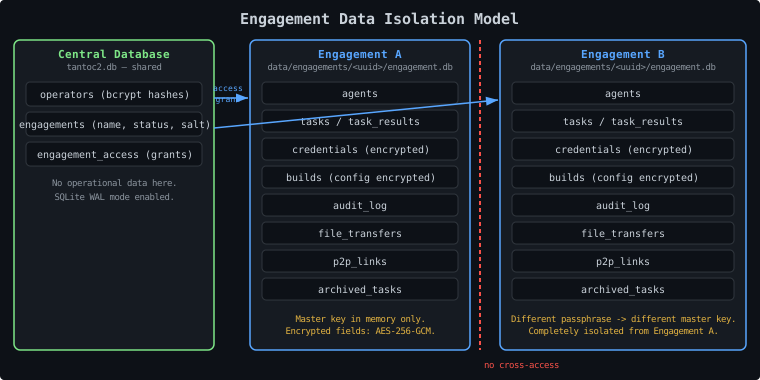
Each engagement has its own SQLite database, master key, and access grants. There is no data leakage between engagements at the database level.
Isolation Guarantees#
- Credentials, agents, tasks, and audit logs are stored in the engagement database
- An operator with access to Engagement A cannot access Engagement B without an explicit grant (unless admin)
- Engagement databases are encrypted at rest — credentials and build configs are AES-256-GCM encrypted
- The master key for each engagement is derived independently from its own passphrase and salt
When Multiple Engagements Are Active#
The background services iterate over all active engagements. Each sweep opens a new database session for each engagement independently. The only shared resources are CPU and disk I/O.
Naming Conventions#
Use consistent naming to keep engagements identifiable:
| |
Examples:
acme-2026-q1-externalglobex-2026-03-internal-redinitech-2026-04-purple
Log Management#
Server Log Location#
If running via systemd:
| |
For Docker:
| |
Log Level#
Default is INFO. For debugging:
| |
Do not run with DEBUG in production — logs grow large and may contain more context than needed in operational logs.
Log Retention#
- Keep operational logs for the duration of the engagement + 30 days
- The audit log in the engagement database is the authoritative record for security events
| |