TLS Configuration#
Why TLS Matters#
The teamserver API carries sensitive data: operator credentials, agent commands, collected credentials, and file contents. Without TLS, any observer on the path between an operator’s workstation and the server can intercept all of this.
Enabling TLS#
Set in ~/.tantoc2/config.yaml:
| |
Or via environment variables:
| |
Generating a Certificate#
For internal use (operator access only), a self-signed certificate is acceptable. Operators must configure the CLI and browser to trust it.
| |
For external-facing deployments, use a certificate from a trusted CA (Let’s Encrypt or internal PKI).
TLS for Transport Listeners#
Transport listeners (the ports agents beacon to) support TLS independently of the operator API. Configure per-listener when creating HTTPS listeners:
| |
JWT Token Configuration#
TantoC2 uses opaque bearer tokens (not JWTs in the strict RFC 7519 sense, but token-based auth with similar properties). The defaults are:
| Token | Default TTL | Notes |
|---|---|---|
| Access token | 3600s (1 hour) | Required for all API calls |
| Refresh token | 86400s (24 hours) | Single-use; exchanged for a new token pair |
These values are compiled into the AuthService class. To change them, the server code must be modified and rebuilt. For most engagements, the defaults are appropriate.
Token Security Properties#
- Tokens are generated with
secrets.token_urlsafe(32)— 256 bits of entropy - Tokens are stored in-memory only. A server restart invalidates all active sessions.
- Refresh tokens are single-use: consuming a refresh token immediately revokes it and issues a new pair
- Revoked JTI values are tracked in-memory to prevent replay attacks within a server session
- Rate limiting: after 5 failed login attempts in a 300-second window, further attempts for that username are rejected
Forcing Logout#
Revoke all tokens for a specific operator immediately (for compromised accounts or departing team members):
| |
API:
| |
Session Key Rotation#
For long-running engagements, enable automatic session key rotation:
| |
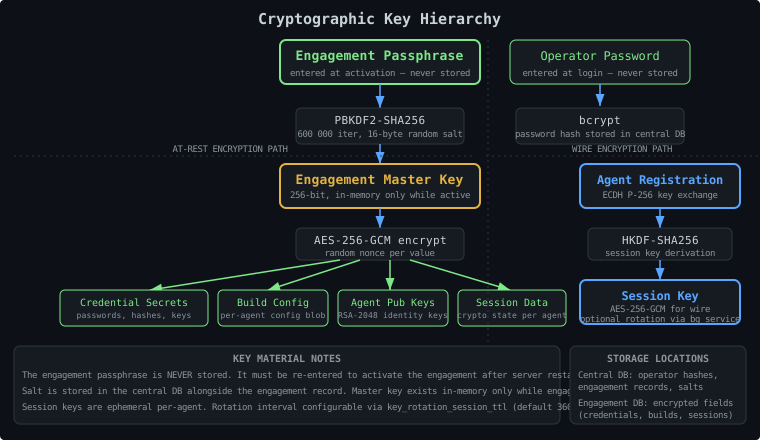
When rotation is triggered, the server marks the session for re-key. On the agent’s next check-in, a new ECDH key exchange is performed transparently. The old session key is discarded.
Master Key Management#
Every engagement is encrypted with a per-engagement master key derived from the engagement passphrase using PBKDF2-SHA256 (600,000 iterations, 16-byte random salt).
Passphrase Requirements#
- The passphrase is never stored — it exists only in memory while the engagement is active
- It must be re-entered each time the server restarts and the engagement is re-activated
- If the passphrase is lost, the engagement data is unrecoverable
- Use a high-entropy passphrase (random words via a password manager or
openssl rand -base64 32)
Passphrase Storage Best Practices#
- Store engagement passphrases in a team password manager (Bitwarden, 1Password, KeePass) separate from the server
- Do not store passphrases in environment variables or config files — they would be readable by anyone with server access
- Document which operator holds the passphrase for each engagement — if that person is unavailable, the engagement cannot be activated
- Consider using a shared vault entry with multiple admins having access
Salt Storage#
The PBKDF2 salt is stored in the central database (data/tantoc2.db) alongside the engagement record. This is correct — the salt is not secret, it prevents precomputation attacks. The salt alone is useless without the passphrase.
Credential Encryption#
Credential secrets collected during an engagement (passwords, NTLM hashes, SSH keys, API keys, etc.) are encrypted at rest using AES-256-GCM with the engagement master key. The plaintext secret is never stored — only the encrypted blob:
| |
This means a compromised database file is not useful to an attacker without the engagement passphrase.
Network Segmentation#
Recommended Topology#
Separate network access by function:
| Network | Accessible From | Hosts |
|---|---|---|
| C2 network (operator) | Operator workstations only | Teamserver (API port :8443), CLI, Web UI |
| WAN / Internet-facing | Internet (filtered by redirectors) | Redirectors, listener ports |
| Target networks | No inbound from Internet | Agents, target systems |
See Deployment and IaC for a Docker Compose reference implementation of this topology.
Firewall Rules#
Minimum firewall configuration for the teamserver host:
| |
For redirector setups, the teamserver listener ports only need to be reachable from the redirector IPs — not the open Internet.
Teamserver Isolation#
The teamserver should not be directly reachable from the target network. Route all agent traffic through redirectors. This:
- Hides the teamserver’s real address from target-side defenders
- Allows redirectors to be sacrificed and replaced without exposing the server
- Provides an additional layer for traffic filtering and logging
Operator Account Management#
Role Assignment#
Apply least-privilege:
| Scenario | Recommended Role |
|---|---|
| Server admin, engagement setup | admin |
| Active red team operator | operator |
| Client observer, QA reviewer | spectator |
| Automated collection agent | collector |
Create operators before the engagement starts. Document who has what role and which engagements they can access.
| |
Or via CLI:
| |
Collector Role#
The collector role starts with read-only access (same as spectator). Elevated permissions are granted dynamically with optional expiry and agent scoping:
| |
Use this for automated tools that need temporary, scoped access. Revoke grants when no longer needed.
Password Policy#
Enforce strong passwords:
- Minimum 20 characters
- No reuse across engagements
- Changed after engagement completion (or immediately if suspected compromise)
- Never communicated over unencrypted channels
Disabling Accounts#
When an operator’s engagement access should be suspended without deleting their account:
| |
Disabled accounts cannot log in. Force logout any existing sessions first.
Audit Log Monitoring#
Every security-relevant action within an engagement is written to the per-engagement audit log. Security events (failed auth, force logout, privilege changes) also emit a security_alert WebSocket event for real-time notification.
What Is Logged#
- Operator login and logout
- Failed authentication attempts
- Engagement activation and deactivation
- Operator creation, modification, deletion
- Engagement access grants and revocations
- Module executions
- Credential access and export
- Agent registration and status transitions
- File transfers
- Collector grant creation and revocation
Querying the Audit Log#
CLI:
| |
API:
| |
Retention#
Audit log entries are stored in the per-engagement database. They are not moved to the archive table (unlike tasks). Back up the engagement database to retain the audit trail.
For long-term retention beyond the engagement lifecycle, export the audit log before archiving or deleting the engagement.
Monitoring Recommendations#
Watch for these patterns during an engagement:
- Multiple failed logins from the same source → brute force
- Logins from unexpected IP addresses → possible credential theft
- Bulk credential exports → insider threat
- Unusual task volumes outside working hours → unplanned agent activity
Plugin Security#
Plugins are Python wheel packages that run in the teamserver process with full Python access. A malicious plugin can do anything the server process can do.
Only Install Trusted Wheels#
- Use wheels built from your own source or from a distribution you control
- Verify SHA-256 checksums against your distribution’s manifest before installing
- Never install wheels from untrusted third parties into a production server
Plugin Inbox Permissions#
The plugin_inbox_dir (default: <data_dir>/plugin_inbox) is polled by the server and auto-installs any .whl file dropped there. Restrict write access:
| |
With this configuration, the tantoc2 service user can only execute (scan) the directory, not write to it. The admin account places wheels there explicitly.
Reviewing Plugin Code#
Before deploying a third-party plugin:
- Unzip the wheel (it’s a zip file):
unzip plugin.whl -d /tmp/plugin-review/ - Review all Python files — look for network calls, subprocess execution, file operations
- Check the entry points in
*.dist-info/entry_points.txt - Test in an isolated non-production environment first
Log Redaction#
Enabled by default (log_redaction_enabled: true). The server filters sensitive values from all log output:
- Credentials and secrets
- Callback addresses (listener URLs)
- Cryptographic keys and tokens
- Session material
Disable only for debugging, and only on a non-production server:
| |
Re-enable before any operational use. Log files with redaction disabled may contain cleartext credentials and key material.
Security Checklist Summary#
| Item | Config / Command |
|---|---|
| TLS on operator API | tls_enabled: true + cert/key files |
| TLS on agent-facing listeners | per-listener --tls flag |
| Strong admin password | Change immediately after first boot |
| Log redaction on | log_redaction_enabled: true (default) |
| Key rotation (long engagements) | key_rotation_enabled: true |
| Firewall: API port restricted | iptables / security group rules |
| Firewall: listeners not directly reachable | Route via redirectors |
| Plugin inbox write-restricted | chmod 730 plugin_inbox/ |
| Engagement passphrase in secure vault | External password manager |
| Operator accounts with correct roles | Least-privilege assignment |
| Force-logout for departing operators | operators force-logout |
| Audit log backed up | Include engagement DB in backups |