Lifecycle Overview#
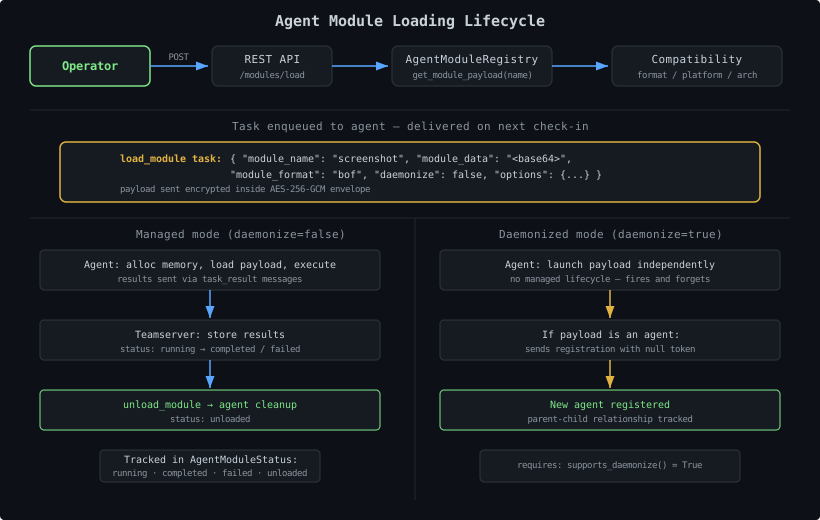
- You create a compiled payload in a format your target agent supports
- You write a
manifest.yamldescribing the payload’s metadata and options - You place both in a subdirectory under
agent_modules/ - The
AgentModuleRegistrydiscovers and validates the manifest on startup - Operators select compatible modules for a specific agent
- The teamserver sends a
load_moduletask with the base64-encoded payload - The agent receives the payload and executes it in managed or daemonized mode
Creating a Module#
Step 1: Write your payload#
Create the compiled payload in whatever format your target agent supports. Common formats:
format value | Extension | Description |
|---|---|---|
bof | .o | Beacon Object File (COFF object) |
shellcode | .bin | Position-independent shellcode |
dll | .dll | Windows DLL with a specific export |
coff | .o | COFF object file |
py | .py | Python script (for the dev agent) |
Any string works as a format identifier. The teamserver matches format against what the target agent declares in supported_module_formats(). A module will only appear in the compatible list if the format matches.
Step 2: Write manifest.yaml#
Create manifest.yaml in the same directory as your payload:
| |
Manifest Reference#
Required Fields#
| Field | Type | Description |
|---|---|---|
name | str | Unique module name. Must be globally unique across all agent modules. |
description | str | Human-readable description shown in the UI and CLI. |
author | str | Author name. |
format | str | Format identifier — must exactly match a value in the target agent’s supported_module_formats(). |
Optional Fields#
| Field | Type | Default | Description |
|---|---|---|---|
platforms | list[str] | [] | Target platforms: windows, linux, macos. Empty = all platforms. |
architectures | list[str] | [] | Target architectures: x64, x86, arm64, any. Empty = all arches. any matches all. |
version | str | "1.0.0" | Module version string. |
privilege_required | bool | str | false | Whether elevated privileges are needed. |
mitre_attack | list[str] | [] | MITRE ATT&CK technique IDs. |
payload_file | str | auto-detect | Filename of the payload relative to the module directory. If omitted, the registry picks the first non-YAML file in the directory. |
options_schema | dict | {} | Options operators can pass when loading the module (see below). |
options_schema Format#
Each key in options_schema is an option name. The value is a dict with these fields:
| |
Step 3: Directory Layout#
Place your module in a subdirectory of agent_modules/:
| |
Each subdirectory must contain a manifest.yaml (or manifest.yml). The registry scans all subdirectories recursively.
Compatibility Filtering#
The AgentModuleRegistry uses AgentModuleDescriptor.is_compatible() to match modules to agents on three dimensions:
| |
An empty platforms or architectures list in the manifest means “all” — the filter is skipped. any in architectures matches every agent architecture.
Loading Modes#
Managed Mode (default, daemonize=false)#
The agent:
- Allocates memory and loads the payload
- Executes it synchronously
- Returns results through its C2 channel as
task_resultmessages - Tracks the module lifecycle (running, completed, failed)
- Supports clean unload via an
unload_moduletask
Managed mode is the default. Long-running modules can stream results across multiple check-in cycles.
Daemonized Mode (daemonize=true)#
The agent:
- Launches the payload independently (does not wait for results)
- Loses the managed lifecycle — there is no
unload_module
If the payload is a C2 agent itself (e.g., Shinobi shellcode), it:
- Performs its own registration handshake with the teamserver
- Registers as a brand-new agent
- The teamserver records the parent-child relationship for P2P topology
Requires the loading agent to declare supports_daemonize() = True.
Task Payloads#
The teamserver sends these task types when managing agent modules.
load_module#
| |
unload_module#
| |
The agent handles these task types as declared in its built-in command list.
Module Status Tracking#
The teamserver tracks each loaded module per agent:
| Status | Meaning |
|---|---|
running | Module is loaded and executing |
completed | Module finished normally |
failed | Module execution failed |
unloaded | Module was cleanly unloaded by operator |
Python Modules for the Dev Agent#
The dev agent supports format: py. Python modules must export a run(options) function:
| |
With manifest:
| |
Reference: Dev Agent Bundled Modules#
The dev agent ships three bundled Python modules at dev_agent/src/tantoc2_dev_agent/:
| Module | Format | Description |
|---|---|---|
hello_world | py | Minimal test — verifies managed module loading works |
sysinfo | py | Collect system information (OS, hostname, interfaces) |
port_check | py | Check if specific ports are open on the local host |
Study their manifests for working examples:
| |
Bundling Modules with an Agent Package#
Agent packages can ship bundled modules via agent_modules_dir():
| |
The AgentModuleRegistry.discover_from_packages() call at startup scans all registered agent packages and adds their module directories automatically.
Discovery and Refresh#
| |
refresh() on the AgentModuleRegistry re-scans all directories — equivalent to a full discover(). Add new modules by dropping them in agent_modules/ and calling refresh.
Common Pitfalls#
Format mismatch — the format field in manifest.yaml must exactly match a string in the agent’s supported_module_formats(). Typos here mean the module never appears as compatible.
Missing any in architectures — if you have a universal payload (e.g., Python script), set architectures: [any]. Without this, an agent with arch x64 won’t match a manifest that lists only x86.
payload_file path — the value is relative to the module directory. Do not include the directory name itself.
Empty platforms/architectures — an empty list means “all” (no filter). If you only target Windows but leave platforms: [], the module will appear as compatible for Linux agents too.
Duplicate names — if two module directories have the same name, the second one is silently skipped. Module names must be globally unique.