What Can You Build?#
| Extension Point | What It Is | Effort | Start Here |
|---|---|---|---|
| Transport Plugin | A listener implementation (HTTP, DNS, named pipes, etc.) | Medium | You need a new C2 channel |
| Tool (Agentless) Plugin | A Python plugin for direct network interaction (SSH, SMB, LDAP, etc.) | Small–Medium | You want to interact with a new protocol without deploying an agent |
| Agent Module | A compiled payload (BOF, shellcode, DLL, etc.) loaded into agents at runtime | Medium | You have compiled tradecraft to deploy through agents |
| Agent Package | A complete deployable agent with its own crypto, wire protocol, build pipeline, and capabilities | Large | You want to create a new agent in Go, Rust, C, etc. |
Plugin Architecture#
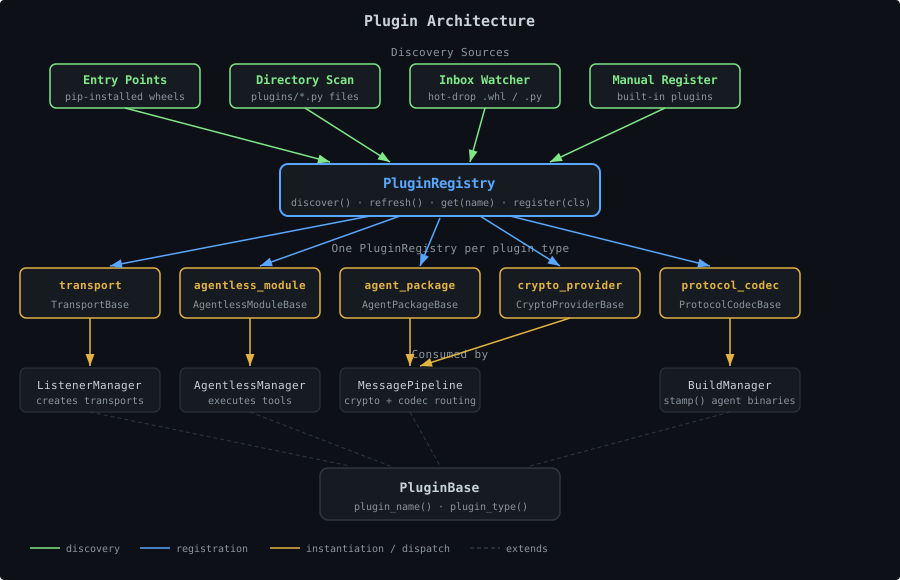
All plugin types share the same underlying mechanism:
- Every plugin extends
PluginBasewith a uniqueplugin_name()and aplugin_type() - Discovery is automatic — drop a
.pyfile in the right directory, or install a wheel with entry points - Hot-reload without restart — the plugin watcher detects changes and reloads
- No core changes needed — the framework discovers and wires everything at runtime
| |
PluginRegistry is the generic container. There is one registry per plugin type. The server instantiates five registries at startup and passes them to the MessagePipeline, ListenerManager, AgentlessManager, and BuildManager.
Plugin Discovery#
Plugins are discovered through three mechanisms, all feeding into PluginRegistry:
1. Python Entry Points (Recommended)#
Package your plugin as a wheel and declare entry points in pyproject.toml. This is how all official plugins are distributed:
| |
Entry point names (left side of =) must match plugin_name() return values. The registry calls discover_entry_points(group) at startup and on each refresh().
2. Directory Scanning#
PluginRegistry scans configured directories for .py files. Files beginning with _ are skipped. Any non-abstract subclass of the base class found in the file is registered.
| |
On refresh(), the registry checks file modification times (mtime) and reloads changed files, deregistering old classes and loading new ones.
3. Plugin Inbox (Hot-Drop)#
Drop files into the inbox directory (configured as plugin_inbox_dir). The PluginInboxWatcher polls the inbox on a timer:
.whlfiles:pip install-ed into the current venv, then all registriesrefresh()entry points. Failed installs are moved toinbox/failed/.- After install,
MessagePipeline.rebuild_maps()is called so new agent packages are immediately routable.
The PluginRegistry in Detail#
| |
refresh() is additive for entry points but will remove plugins from deleted files. It never clears active MessagePipeline sessions.
Development Setup#
Install the server in dev mode#
| |
Working with a local plugin#
| |
Running tests#
| |
Plugin Type Quick Reference#
| Base Class | Module | plugin_type() | Entry Point Group |
|---|---|---|---|
TransportBase | tantoc2.server.transports_module | transport | tantoc2.transports |
AgentlessModuleBase | tantoc2.server.agentless_base | agentless_module | tantoc2.agentless_modules |
AgentPackageBase | tantoc2.server.agent_package | agent_package | tantoc2.agent_packages |
CryptoProviderBase | tantoc2.server.crypto_provider | crypto_provider | tantoc2.crypto_providers |
ProtocolCodecBase | tantoc2.server.protocol_codec | protocol_codec | tantoc2.protocol_codecs |
Agent modules are not Python plugins — they are compiled payloads discovered via YAML manifests in agent_modules/. See Building Agent Modules.
Dependency Auto-Installation#
Python plugins (server modules and tools) can declare pip dependencies in their metadata. The manager auto-installs them at discovery time:
| |
If installation fails, the module is tracked as unavailable. It will not appear in list_modules() results but its failure reason is accessible via unavailable_modules on the manager. Check the server log for details.
Next Steps#
Pick the extension point that matches your goal:
- New C2 channel → Building Transport Plugins
- New protocol interaction → Building Tools (Agentless) Plugins
- Compiled tradecraft → Building Agent Modules
- New agent type → Building Agent Packages
- Packaging and distributing → Plugin Packaging